

Linux commands are an essential part of any Linux-based operating system. They allow users to interact with the system and perform important tasks, ranging from basic system functions to more complex ones. In this blog post, we’ll be taking a look at the top 50 most used Linux commands in 2023. Whether you’re just getting started with Linux or have been using it for years, these commands will be sure to come in handy.
List of the top 50 most used Linux commands in 2023
01) pwd: print working directory.
02) whoami: who am i.
03) hostname: name of the current host system.
04) uname: UNIX name.
05) sudo: Superuser do.
06) apt: Advanced Package Tool.
07) ls: list
08) clear: clear the Terminal.
09) echo: Display the argument (display line of text or string).
10) cd: change directory.
11) man & help: manual page.
12) history: Terminal histories.
13) touch: create, change and update file.
14) chmod: change mode
15) useradd & userdel: user add & user delete.
16) chown: change owner.
17) cat: concatenate (display contents).
18) nano: text editor
19) mkdir: make directory.
20) rmdir: remove directory.
21) rm: remove.
22) mv: move
23) cp: copy.
24) dpkg: debian package manager.
25) wget: download files
26) df: disk free.
27) du: disk usage.
28) less: view the content but not change.
29) wc: word count.
30) head: print from a top-bottom specific line of data.
31) tail: print from a bottom-top specific line of data.
32) ping: packet interNet groper.
33) locate: finds files.
34) which: search the list of paths.
35) find: locate the list of files and directories based on condition.
36) grep: global regular expression print.
37) zip & unzip: compress & uncompress file and directory.
38) tar & untar: tape archive & uncompress tape archive.
39) diff: difference.
40) tac: reverse of cat command.
41) tr: translate.
42) sort: sort the content line by line.
43) uniq: remove all duplications from a file.
44) od: octal dump.
45) mount & umount: mount an external memory device or filesystem.
46) passwd: password (set & change)
47) ps: process status.
48) ifconfig: interface configuration.
49) kill: terminate processes.
50) exit: exit from the terminal session
How to Use These Top 50 most used Linux Commands in 2023
This guide will provide you with an overview of the top 50 most used Linux Commands in 2023 and how to use them. We’ll start by looking at the basics of Linux commands and then work our way up to more advanced topics like file management, security, system administration, and networking. By the end of this guide, you should have a good understanding of the most commonly used commands in Linux and how to make the most of them in 2023. Web application security researchers and network security engineers widely use UNIX/Linux systems.
Additionally, if there are any commands that are not included on the list of top 50, it’s probably worth searching for more information about that command online. For example, Linux offers several options when it comes to text editors – some being easier than others. A command such as nano might be on your radar if you’re just starting to stay ahead of the game and keep up with the changes happening in Linux in 2023, refer back to this guide often! But, as your skills advance over time, Vim may be better suited to your needs. With continued practice and patience, mastering Linux commands can help you become a Linux power user!
The Top 50 most used Linux Commands in 2023
Learning the basic Linux commands can help you navigate and manage your system more efficiently. Here are some of the most commonly used commands:
Let’s start the list of basic Linux commands with examples
1)PWD command:
Use this command to print the current working directory, i.e., the directory you are currently in.

2) whoami command:
Invoking this command returns the username of the currently logged-in user.

3) hostname command:
This command allows users to view and set the system’s hostname or domain name.

4) uname command:
The Unix Name command, abbreviated as uname, prints comprehensive details about your Linux system, including the machine name.

5) sudo command:
This command, which stands for “SuperUser Do,”, The sudo command allows you to run programs with the security privileges of another user.

6) apt-get command:
To work with packages from the Linux command line, use apt. Install packages by using apt-get. Use the sudo command with it as root capabilities are required for this.
7) ls comamnd:
The ls command lists the contents of a directory. To use it, simply type ls followed by the name of the directory you want to list. For example, <ls /home/user/documents>.

8) clear command:
If the terminal is becoming too crowded from too many previous operations, use the clear command to clear it away.
9) echo command:
We may transfer some data, often text, into a file using the “echo” command.

10) cd command:
Use the cd command to browse among the Linux files and directories. Either the whole path or the directory name is required.

11) man and help command:
It shows the manual pages of the command. Use the man command to learn more about the command and how to use it.

12) history command:
After using Linux for a while, you’ll quickly realize that you can execute hundreds of commands per day. Running history command is therefore very helpful if you wish to examine the commands you’ve already typed.

13) touch command:
The touch command is used to create a new empty file. To create a new file, simply type touch followed by the name of the file you want to create. For example, <touch newfile>.

14) chmod command:
A file’s access mode can be changed using the chmod command. The modes specify which permissions should be added to or taken away from the designated classes. There are three fundamental modes that line up with the fundamental permissions:
r (4) -> permission to read the file.
w (2) -> permission to write the file.
x (1) -> permission to execute the file.
0 -> no permission.

15) useradd and userdel command:
In Linux, the useradd command is used to add user accounts to your system. Linux is a multi-user operating system, which allows several users to interact with the system at once.
userdel command in the Linux system is used to delete a user account and related files. This command basically modifies the system account files, deleting all the entries which refer to the username LOGIN.
“sudo userdel -f learnoffsec-test”


16) chown command:
On Unix and Unix-like operating systems, the command chown, which stands for change owner, is used to change the owner of the file system files and directories. All files in Linux are given authorization access permissions for the file owner, the group members, and others. Each file is also allocated an owner and a group.
“chown owner_name file_name”

17) cat command:
The cat command is used to display the contents of a file. To use it, type cat followed by the name of the file you want to display. For example, <cat filename>.

18) nano command:
The UW Pico text editor can be replaced with the user-friendly, straightforward, and WYSIWYG (What You See Is What You Get) Nano text editor. You may edit and create a variety of files on your computer or server using Nano’s numerous sophisticated capabilities.
“nano <filename/file path>”

19) mkdir command:
The mkdir command allows you to create a directory. To use it, simply type mkdir followed by the name of the directory you wish to create. For example, mkdir testdir

20) rmdir command:
The Directory option specifies a directory that is removed from the system by the rmdir command. Use the rmdir command to remove a directory if necessary. rmdir, however, simply enables you to remove empty directories.

21) rm command:
The rm command is used to delete items from a UNIX-like file system, including files, directories, symbolic links, and more. However, only empty directories may be deleted using the rmdir command; non-empty directories can also be deleted using the rm command.

22) mv command:
The mv command is used to move or rename files and directories. For example, if you wish to move a file from one directory to another, you can use the mv command like this: mv filename new_location. Similarly, if you wish to rename a file, you can use the mv command with two arguments, like this:
<mv oldfilename newfilename>.

23) cp command:
To copy files from the current directory to another directory, use the cp command. It produces a duplicate file with the same name on a disk.

24) dpkg command:
The primary package management application in Debian and Debian-based systems is dpkg. Debian packages may be installed, created, removed, and managed using the dpkg program. The command supports .deb-formatted packages. In dpkg, we mostly utilized two options:
a) Use the -i flag to install any .deb packages.
b) -r for removing/uninstalling any.deb packages

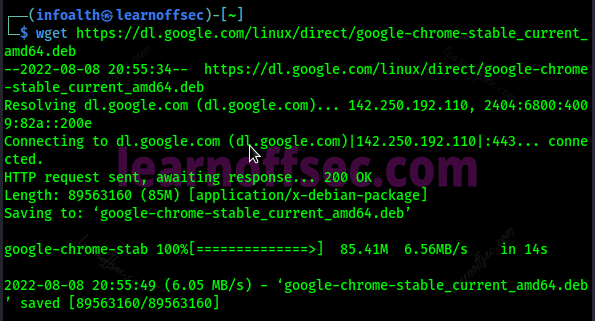
25) wget command:
A command-line tool for obtaining files from the internet is called wget. You may download files over the FTP, HTTP, and HTTPS protocols using Wget. If a download fails due to a network issue, wget will keep retrying until the entire file has been downloaded. Wget has been intended for resilience over slow or unpredictable network connections.
26) df command:
The df command is short for disk free, Get a report on the system’s disk space use with the df command, which displays data in percentage and KB units.

27) du command:
The du short for disk usage, The du command is the solution if you want to find out how much space a file or directory uses. In contrast, disk block numbers rather than the customary size format will be displayed in the disk utilization summary. The -h parameter in the du program provides the file or folder size in bytes.

28) less command:
The less command displays a file’s contents one screen at a time. Because it reads the file page by page rather than loading the full thing at once, it is helpful for working with huge text files because it produces quick loading times. less <filename> ; Simply press the in q button to end the program or shut the file. 
29) wc command:
A file’s lines, words, and characters can be counted using the Linux wc command. It shows the total amount of lines, characters, and words in a file. It is typically used with pipes to perform counting operations.

30) head command:
The head command prints the first N numbers of data from the specified input, as the name suggests. It prints the first 10 lines of the selected files by default. Head has a number of parameters, though, that you may use to alter the output.

31) tail command:
The tail command performs a similar task to the head one by displaying the final 10 lines of a text file rather than the first ten. Data from each file is preceded by its file name if more than one file name is given.

32) ping command:
The ping command is used to send ICMP echo requests and measure the round-trip time for a response. It can be used to check whether a host is reachable or not.

33) locate command:
In Linux, the locate command uses the file name to locate files. When speed is important, locate is a vital tool since it allows for quick results.

34) which command:
With the help of the which command, you may find a command by looking for its executable in the folders listed by the PATH environment variable.

35) find command:
The find command is used to look up files that match the arguments by searching and locating them in a list of directories and files. The main lesson here is that find works in real-time and can handle a variety of search parameters, whereas locate is very quick but requires a cached list to get results.

36) grep command:
Using the grep command, you may look in a particular file for a string of characters. A regular expression is a name given to the text search pattern. When it locates a match, it displays the line with the result.

37) zip & unzip command:
For Unix, ZIP is a compression and file packaging tool. The extension .zip designates a single file that contains all of the files. The compressed files may be extracted from a zip archive using the unzip command.

38) tar & untar command:
the tar command stands for tape archive and the most popular command to create compressed archive files that can be readily moved from one drive to another disk or machine to machine is tar. Untar is a command that enables users to extract files that have been compressed using the tar, tar.gz, and tar.bz2 formats. The tar command’s -cf argument aids in creating .tar files and -xf for extracting all files from archive.tar.

39) diff command:
the diff stands for difference, Line by line, and two files’ contents are compared using the diff command. It will produce lines that don’t match after examining the files. It informs us where lines in one file need to be modified to make the two files identical, unlike its companion members cmp and comm.

40) tac command:
The opposite of the cat command is the “tac” command. The contents of the file will be shown backward. The last line is printed first, followed by the next-to-last, and so on. In this manner, the first line is printed last.

41) tr command:
it stands for translate, A command line tool for translating or erasing characters is the tr command in UNIX/Linux. A variety of transformations are supported, including changing capital letters to lowercase, squeezing repetitive characters, erasing particular characters, and simple search and replace. It can support more complicated translation when used with UNIX pipes.

42) sort command:
A file is sorted using the SORT command, which places the records in a specific order. The sort command by default sorts files under the assumption that their data is ASCII. Numerical sorting is another option available through the sort command.

43) uniq command:
You can eliminate duplicate lines from the output by using the uniq command. In order for us to examine the output properly, it actually discards repeated lines and prints the first line that follows a repeated line.

44) od command:
The od command produces an unambiguous representation of FILE using octal bytes by default. If more than one file is specified, the input is created by concatenating the files in the listed order by the od command. Hexadecimal, decimal, and ASCII are just a few of the numerous forms that it can display output.

45) mount & umount command:
Users can mount, or attach extra child file systems to a specific mount point on the currently accessible file system, using the mount command. The kernel completes the process after receiving the mount instructions from the command. The umount command tells the system to finish any outstanding read or write operations before securely removing a mounted filesystem.

46) passwd command:
On Kali Linux, the passwd tool is frequently used to manage user accounts. The passwd command modifies user account passwords. A superuser can change the password for any account, while a normal user can only change the password for their own account. passwd also modifies the duration of an account’s or password’s related validity.

47) ps command:
The ps command, which stands for Process Status, is a command-line tool used to show or inspect details about the processes that are currently active in a Linux system. Linux is a multitasking and multiprocessing operating system, as we are all aware. It reads the process information from the virtual files in **/proc** file system.

48) ifconfig command:
The ifconfig command is used to configure network interfaces. It can be used to view information such as IP address, subnet mask, broadcast address, etc. It can also be used to enable or disable a network interface.

49) kill command:
In debian, the kill command is a built-in command. It is utilized to manually end operations. The kill command behaves a little differently in shells than it does in the standalone /bin/kill executable.

50) exit command:
To leave the current shell. It accepts a parameter in the form of a number and exits the shell with a status return. The status of the most recent command that was run would be returned if no parameters were provided. A script is closed and the shell is ended using the exit command.

Conclusion
This blog provides you with an overview of the 50 most important Linux commands and how to use them. We hope that this list of Linux commands may aid in your beginnings. Some of the fundamental commands might be difficult to recall, but with enough practice, nothing is impossible.
FAQs
There are some steps to start the learn Linux:
We suggest, installing the Debian os on your virtual machine. for that;
Download the virtual machine (VMWare or Virtual Box)
Download any one Debian virtual machine os file.
Open the virtual machine and load the Debian virtual machine os file.
Configure some basic steps (private information like storage, username, password, location, etc)
After that, now start your Debian machine and start the journey of UNIX/Debian learning.
Not exactly, the fundamentals are easy to learn which is the first step, after that how much you used the Linux machine determines the result of mastering Linux.
The easy way to create the file in Linux, using the touch command.
Learning the basic Linux commands can help you navigate and manage your system more efficiently. Here are some of the most commonly used commands:ls: Use this command to list files and directories in a specified directory.cd: Use this command to change the current directory.cp: Use this command to copy files and directories from one location to another.mv: Use this command to move files and directories from one location to another.rm: Use this command to delete files and directories.mkdir: Use this command to create new directories.rmdir: Use this command to remove empty directories.
For managing your files, Linux provides a variety of commands. Here are some of the most commonly used file management commands in Linux:mkdir: The mkdir command allows you to create a directory.mv: mv command renames the files and directories.cat: cat command displays the content of a files.touch: The touch command is used to create a new empty file.ls: The ls command lists the contents of a directory.
First, locate or create a .sh file, check the permission of the file, or run the command chmod 777 <filename.sh> to get execute permission then run the .sh file using the command “bash filename.sh” or “./filename.sh”
There are two methods to check the os in Linux:hostnamectl
cat /etc/os-release
To get all terminal commands using compgen command with -c flag.